
With over 556 million visits to Booking.com in March 2024, the platform is definitely a go-to place if you’re thinking about listing your property there.
At the same time, more than 29 million total reported listings mean the competition is stiff.
So, how to start advertising on Booking.com and make your property more visible?
It should be pretty doable with our tips.
Let’s dive in!
How Does Booking.com Function?
Booking.com is a commission-based model, which means you pay a set percentage on each reservation you get through the platform.
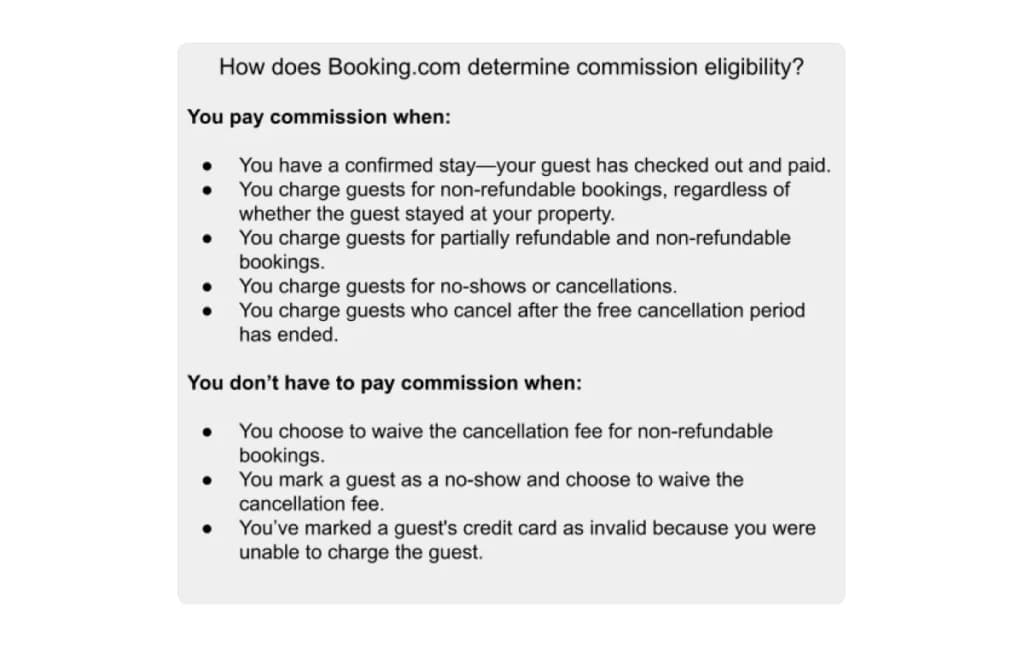
You’ll receive an invoice at the beginning of each month that includes all your bookings for the previous month and the total commission for those bookings.
On average, it is about 15%, but you’ll know the exact amount once you’ve read the Accommodation Agreement when signing up to the platform.
? Note:
Booking.com won’t charge a commission if your property has been on the platform for less than a month or if you’ve had fewer than 5 overbookings yearly.
Why Should You Advertise on Booking.com?
Spanning over 200 countries, Booking.com provides a huge pool of travelers actively searching for accommodations.
Thus, listing your property can lead to greater visibility, which can consequently attract more guests and bookings.
Besides this, Booking.com also offers:
- Free listings.
- An easy-to-use and navigable platform.
- Multiple-language possibilities.
- 24/7 access and customer support.
- Marketing tools to help you better target your audience and track your ad campaigns.
- A mobile app for iOS and Android.
- A possibility for guests to leave reviews, acting as powerful referrals.
In order to reap the benefits of advertising on the platform, you should optimize your listing to make it more attractive and clickable.
It can be a lengthy process, covering everything from compelling photos to amenities and pricing.
However, we’re happy to show you how you can list your property on Booking.com to make the process smoother.
How To List Your Property on Booking.com in 6 Steps?
Before you get started, you need to ensure that your accommodation, regardless of its type, meets certain basic criteria.
For example:
- Is it clean enough?
- Does it have access to the Internet?
- Does it have functioning furniture?
- Is there enough daylight?
Let’s assume you’ve already created a Partner account and signed the Accommodation Agreement.
Step 1: Choose A Property Type
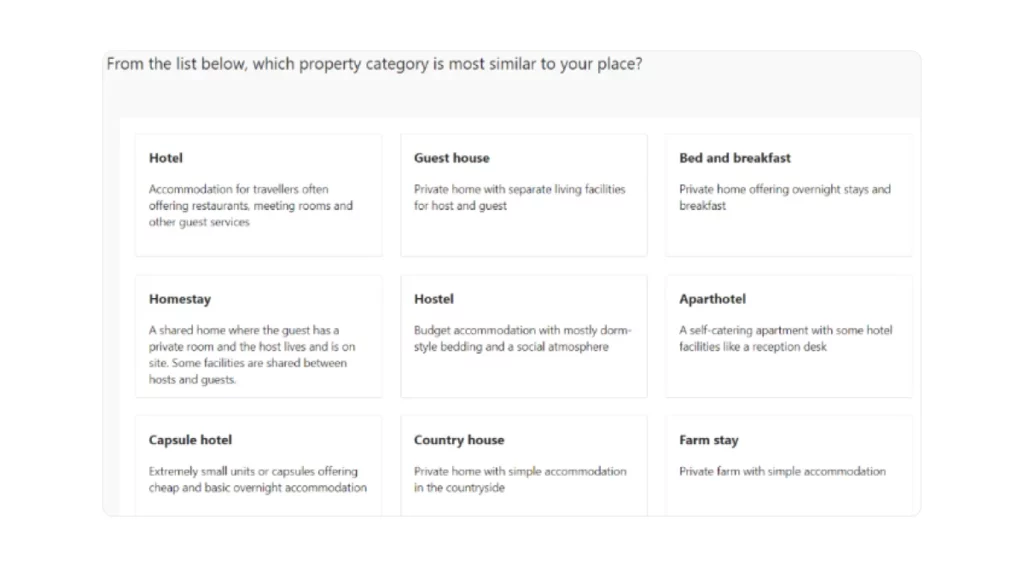
Once you’ve signed up, you can choose a property type you wish to list: a hotel, B&B, vacation rental, etc.
When you choose a property type, you’ll receive a list of more detailed property descriptions so you can see which one best suits you.
This is an important step because it will determine how your future guests will find you via the Booking.com filters.
What is other information you can expect to include?
- You’ll also need to enter basic info about your property, including its name, location, and contact details.
- Regarding location, you can pin the location of your property so your guests will know exactly where to find you.
- In addition, if your property is near famous landmarks or attractions, pinning it can boost its popularity even further.
Again, the input info will depend on your property type.
For example, for hotels, you’ll be able to fill a star number, whether you are a property management company or part of a group or chain, etc.
? Note:
The more information you provide, the easier it is for possible guests to learn more about your property and make a booking.
When you provide sufficient information to people browsing your Booking profile, you enable them to make an informed decision and more readily hit the “Book now” button.
Step 2: Choose Amenities
The next thing on the agenda is to add facilities or amenities your property provides. The initial list represents facilities that are most popular among guests.
In case you don’t see an amenity or facility you provide, you can add more from a larger list after you’ve completed registration.
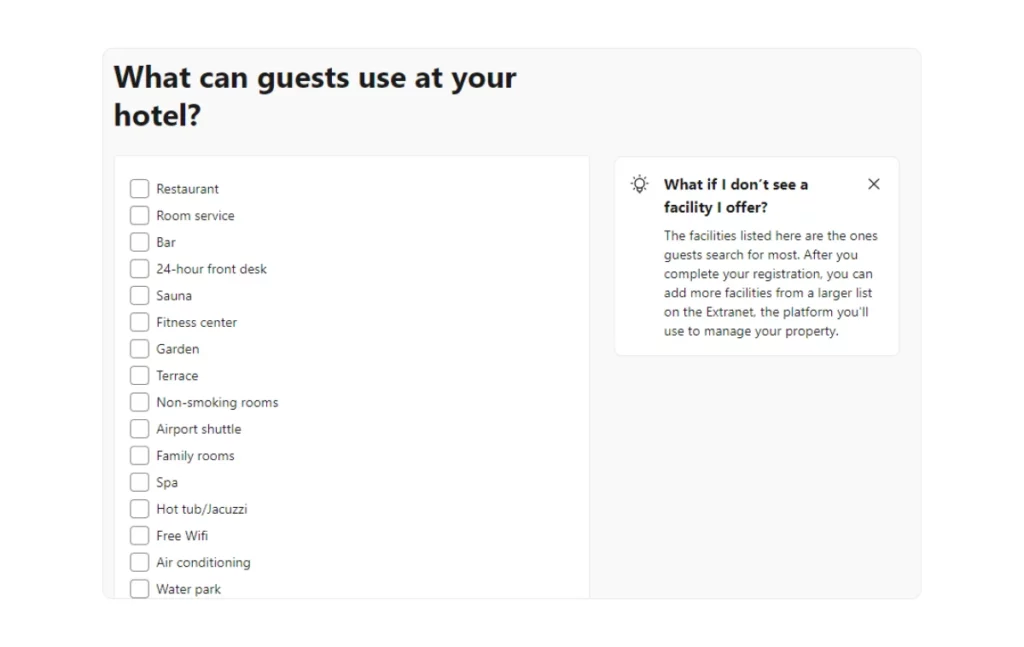
Adding amenities is yet another way to showcase your facility and emphasize your property’s selling points.
On top of that, it helps guests narrow their search while helping you target your ideal guest type more effectively.
In addition, you can also choose:
- Breakfast: Do you provide breakfast? If yes, is it complimentary or paid?
- Parking: Do you offer parking? If so, is it free or paid? Is it private or public? Do guests need to reserve a spot?
- House Rules: What are the house rules? For example, what are the check-in and check-out times?
- Languages: What languages does your staff speak?
- Pets: Do you allow pets? If yes, are there any additional fees for bringing pets?
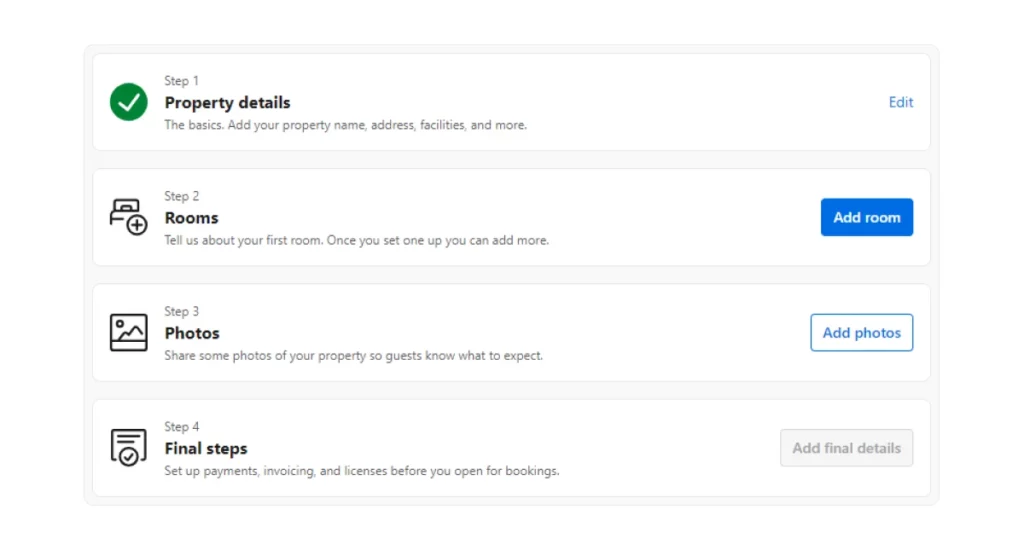
The more facilities you offer, the bigger the chance to attract more guests. Now, you’ve officially completed the Property details section.
Step 3: Add Rooms
When it comes to the room details, here you’ll add information about the room type, number of beds, their size and the room’s size.
Same as with the 2 previous steps, the more details you provide, the better because it makes it transparent what future guests can expect.
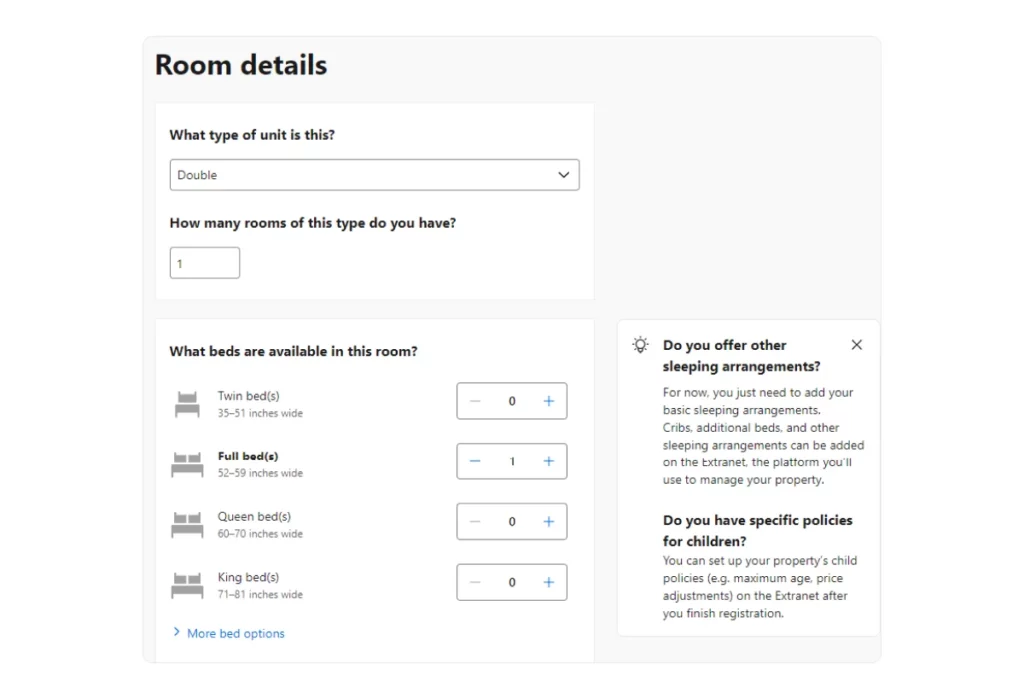
You’ll also include how many people a room can accommodate and if smoking is allowed.
Other info you’ll have to provide is:
- Bathroom Types: What types of bathrooms are available? (e.g., private, shared, ensuite)
- Bathroom Items: What items do you provide in the bathroom? (e.g., toiletries, towels, hairdryer)
- Room Amenities: What general amenities are available in the room? (e.g., TV, wardrobe, heating, electric kettle)
? Note:
Including the room size can be a great upselling option if, for example, your room size is larger than an average hotel room.
Step 4: Set The Price
All aspects of listing your property on Booking.com are essential, but pricing is utterly important because you need to set it right to make a profit.
Furthermore, you still want to have a competitive advantage and not set prices too high or too low.
A good thing about listing on Booking.com is that you can always alter your price according to the current market and seasonal trends.
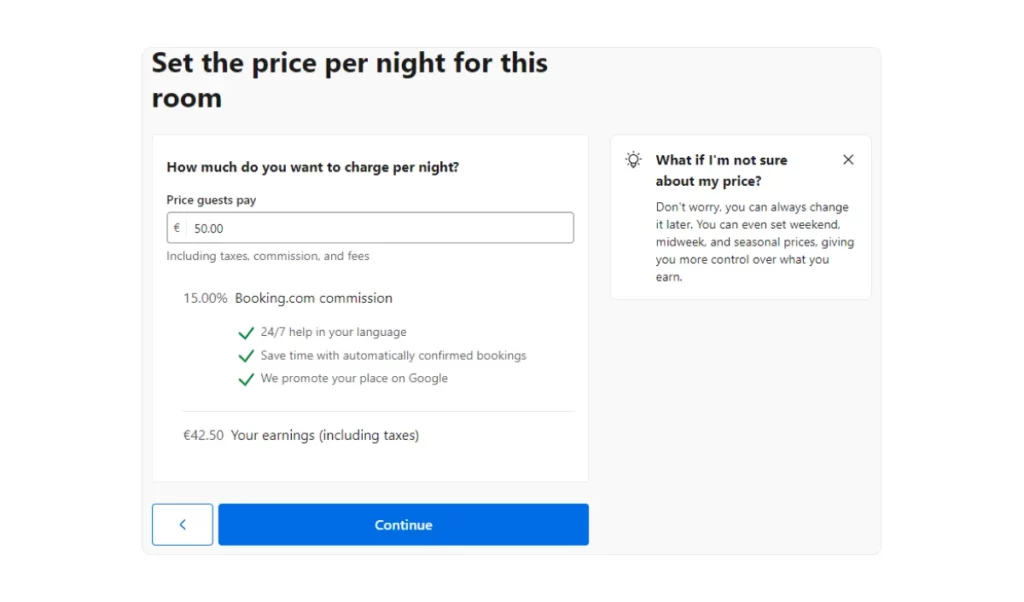
? Note:
Although you can always come back and change your price, it is good to think upfront about what price you are comfortable and profitable with after the commission rate.
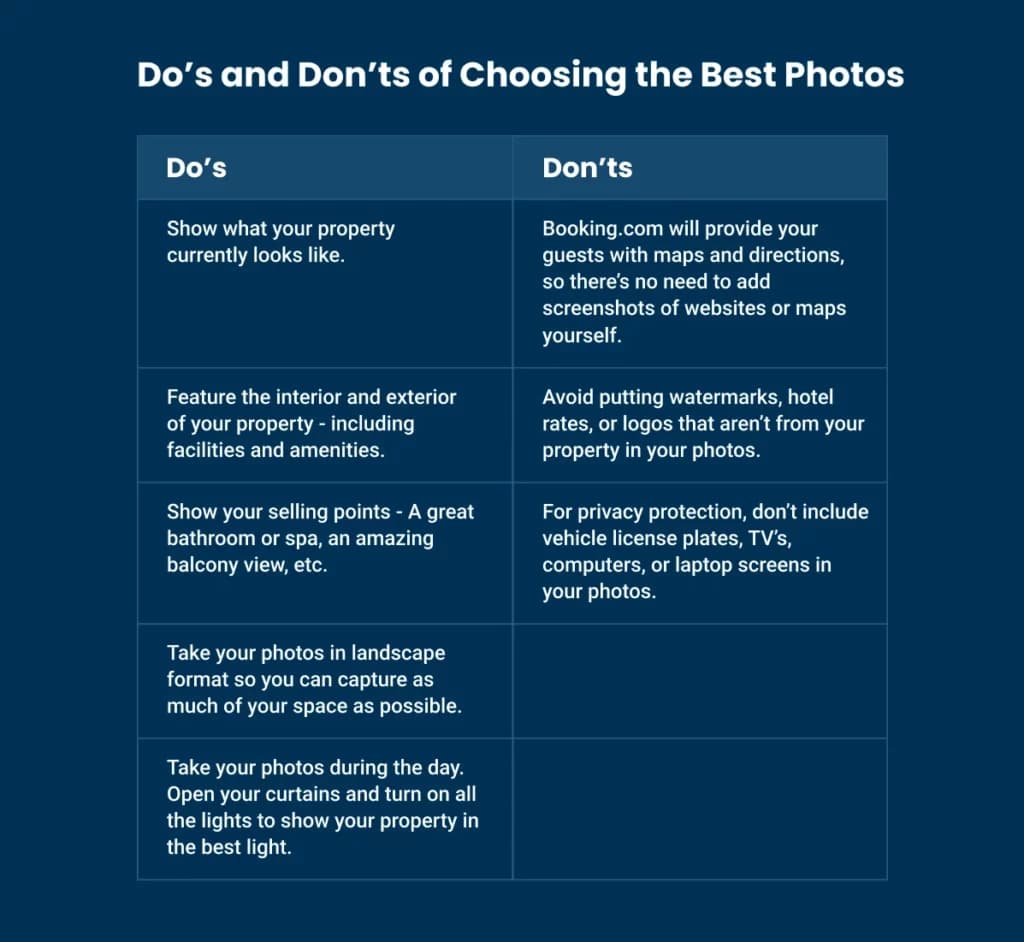
Step 5: Add Photos
High-quality photos are essential when renting out any kind of property.
Potential guests form their first impression based on these images, influencing their decision to learn more and ultimately book your property.
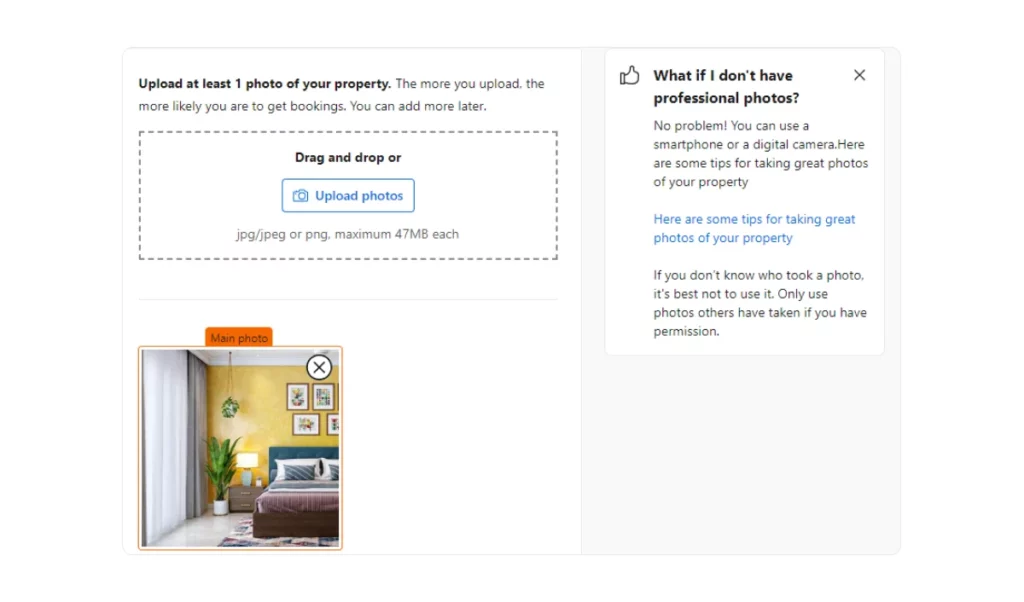
Booking.com allows you to upload multiple photos in .jpeg and .png formats. Each photo should not exceed 47MB.
? Note:
Step 6: Set Up The Final Details
The final step in listing your property is to add payment methods, invoices, and licenses.
While this task may seem tedious compared to the previous steps, it is crucial for ensuring transparency in how you run your property.
This transparency helps eliminate potential questions or disputes about payments and refunds.
In this section, you can also indicate if you use a Channel Manager and integrate one if applicable.
Booking.com offers multiple payment options, including debit and credit cards, PayPal, WeChat Pay, and AliPay.
Optimizing your listing is essential as it is the initial step to effectively advertising your property.
?ProTip
If you advertise on other sites, then make sure you link all the calendars to the channel manager to avoid double reservations.
OTA SYNC’s Channel Manager allows you to connect to major OTAs and easily manage all your listings from one place while expanding your reach.
How to Leverage Advertising on Booking.com in 5 Effective Ways?
Having a listing with high-quality photos and accurate descriptions will nudge visitors to check your property in more detail and possibly make a booking.
Nonetheless, there are additional “tricks” you can use to leverage advertising efforts.
1. Join Genius Program
The Genius program helps you achieve higher levels of visibility and recognition based on the percentage of Genius bookings your property receives.
If you offer discounts to Genius members, you are more likely to be featured prominently on the Booking.com website and search results.
In addition, this way, you can:
✔️ attract more bookings,
✔️ increase occupancy rates, and
✔️ build customer loyalty.
To qualify for the Genius program, you must have a minimum of three reviews with an average score of 7.5 or higher.
2. Offer Mobile Rates
Did you know that over half of all bookings on Booking.com are made via mobile devices?
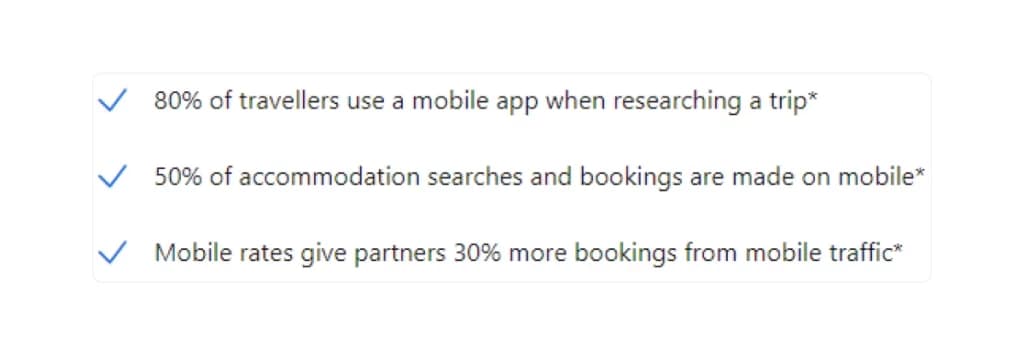
With the increasing number of mobile users, offering a mobile rate is an excellent way to attract more guests, especially millennials.
This demographic writes more reviews than others, and more positive reviews can enhance your property’s credibility and appeal.
Providing an exclusive discount of 10% or higher for mobile users will earn your listing a special badge.
This badge is displayed next to your property, making it easily identifiable to visitors.
3. Join The Preferred Partner Program
To join the Preferred Partner Program on Booking.com, you need to meet the following criteria:
- High Average Score: Maintain an average guest review score of more than 7.
- High Conversion Rate: Ensure that a significant number of guests who view your property end up booking it.
- Updated Booking Calendar: Keep your booking calendar up-to-date with minimal blocked days.
- Timely Invoice Payments: Pay all invoices on time.
It’s important to note that participating in this program requires giving Booking.com a 3% higher commission than your current rate.
4. Tweak Your Availability
Increasing your property’s availability can significantly enhance its visibility to potential guests.
The more dates you have open, the higher the chances of attracting bookings. Additionally, being flexible with dates and offering various rates and rate plans allows you to cater to a broader audience, meeting diverse needs and preferences.
5. Offer Special Promotions
Every now and then, it’s good to get an extra boost by offering special deals and promotions.
They can range from last-minute, early bird, free nights to basic discounts for guests who book a larger number of nights.
You can also create a geo-price list through which you can give special offers to guests from certain countries.
All these promotions and special discounts affect the number of reviews of your accommodation and also represent an additional motivation for potential guests to book.
? Note
Our advice is to attract guests with discounts during low seasons and to give early-bird discounts to count on some reservations in advance.
On the other hand, during the high season, we’d recommend pausing The Partner Program because, due to high demand, there is no need to pay additional commission.
How Can OTA SYNC Increase Your Property’s Visibility?
While listing your property on Booking.com is a fantastic way to start, it’s important to diversify your advertising efforts across multiple platforms.
This ensures broader visibility and maximizes booking opportunities.
OTA SYNC, an all-in-one PMS, is the ultimate solution to help you manage and advertise your property across various OTAs from a centralized dashboard.
Here’s why OTA SYNC stands out:
✨ Centralized Management: View and manage all your channels and multiple properties from a single interface.
✨ Unified Calendar: Easily move, change, and cancel reservations in one place with just a few clicks.
✨ Enhanced Booking Capabilities: Maximize your website’s potential for direct bookings with live availability, rates, special offers, and reduced dependence on OTAs.
✨ Seamless Communication: Improve guest experience with automatic replies and template messages, ensuring smooth and efficient communication.
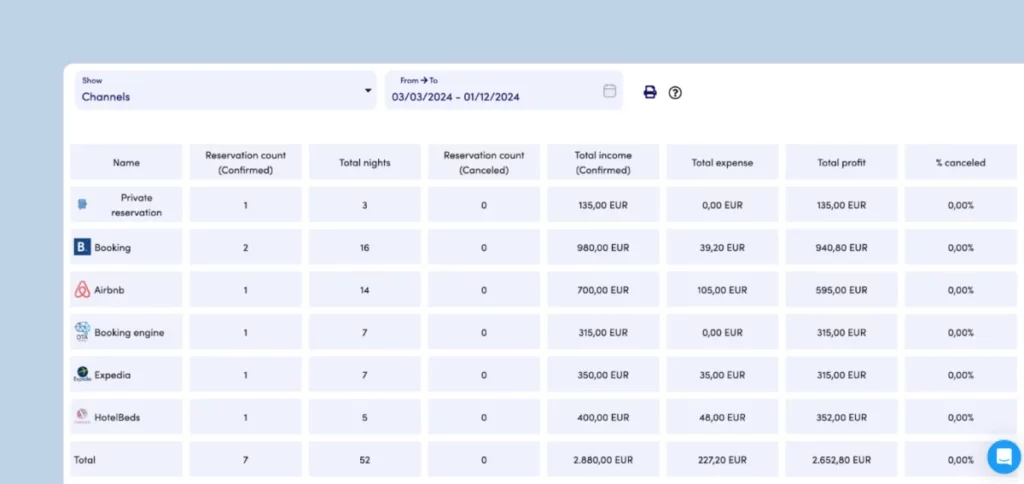
✨ Robust Analytics: Gain insights into which channels bring you the most bookings and revenue, thanks to real-time performance tracking across multiple platforms.
Ready to take your property management to the next level?
Sign up for a 14-day free trial of OTA SYNC and start promoting your property more effectively today!
Keep Learning:
13 Tips on How to Improve Hotel Sales In 2024 [Complete Guide]
How To Start On Airbnb And What You Need To Know [Rental Guide]
 English
 Deutsch
 Français
 Hrvatski
 Srpski
 Crnogorski
 Italiano
 Español
 简体中文
简体中文 Magyar
 Português
 Română
 Русский
 Shqip
Shqip Nederlands
 Ελληνικά
 العربية
 Български